 11
11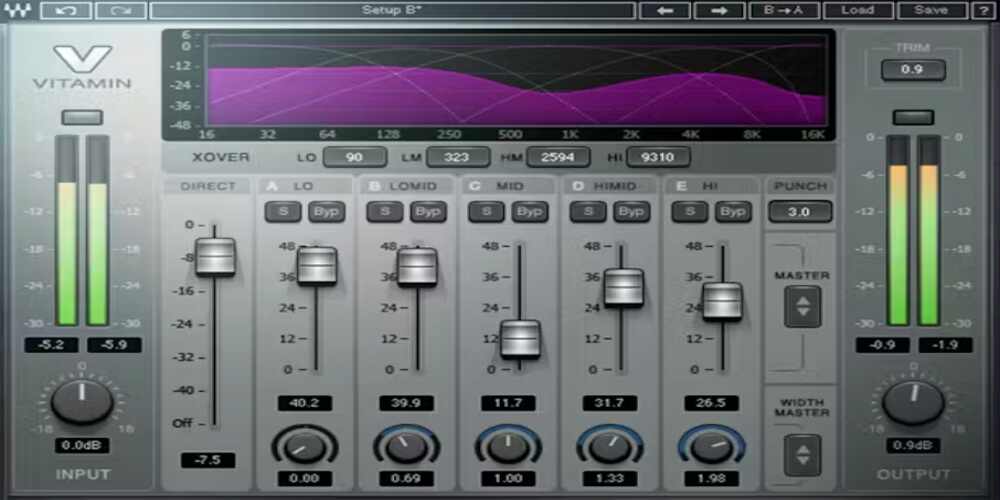
Whether you’re trying to add weight to a kick drum, inject life into a flat vocal, widen a mix that feels too narrow, or coax bass out of a synth that disappears on earbuds, enhancer plugins solve problems that standard EQ and compression can’t. A standard EQ boost just makes existing frequencies louder. An enhancer generates new harmonic content, creates psychoacoustic fullness, and adds character that wasn’t there before. That’s a fundamentally different tool.
This guide covers 10 of the best enhancer plugins available right now, drawn from both the Plugin Alliance and Slate Digital ecosystems, along with standout independent developers. For each plugin, I’ll explain what it actually does, what type of producer or engineer it’s built for, what separates it from competitors, and what you’ll realistically pay for it — including sale prices, since deep discounts in this category are the norm rather than the exception.
Every plugin on this list offers either a free trial or an unlimited demo. There is no reason not to test before you buy.
It’s a fair question. If you can already boost frequencies with an EQ, why do you need an enhancer? The short answer is that EQ and enhancers do different things at a signal level.
A standard EQ boost at 10kHz makes that frequency louder — including any noise or harshness already living there. An enhancer generating harmonics at 10kHz creates entirely new frequency content that didn’t exist in the original signal. The result is brightness and air without raising the noise floor.
Compressors control dynamic range. Enhancers add tonal character. While saturation is one technique they employ, dedicated enhancers combine it with psychoacoustic processing, multiband targeting, transient shaping, stereo imaging, and automatic gain compensation — things that would require three or four separate plugins to replicate manually.
The six main types of enhancer plugins are:
All 10 plugins support both Windows and macOS with Apple Silicon native support, and all support AAX for Pro Tools users.
| Plugin | Type | MSRP | Sale Price | Trial | Formats | Best For |
| SPL BiG | Stereo | $149 | ~$40 | 14-day | VST2/3, AU, AAX | Mono-safe stereo widening |
| Infinity Bass | Bass | $149 | $99 | 14-day | VST2/3, AU, AAX | Subharmonic generation |
| ADPTR HYPE | Multiband | $150 | $70–100 | 14-day | VST2/3, AU, AAX | All-in-one bus/track enhancement |
| MMS Sub-Lift | Low-end | $80 | $25–29 | 7-day | VST2/3, AU, AAX | Budget low-end boost |
| iZotope VEA | Vocal/AI | $29 | $29 | 10-day | AU, VST3, AAX | Podcasters & content creators |
| bx_enhancer | All-in-one | $29 | ~$30 | 14-day | VST/3, AU, AAX | Musicians mixing their own tracks |
| Waves Vitamin | Multiband | $249 | ~$35 | Free tier | VST3, AU, AAX | Mixing & mastering sparkle |
| FG-Bomber | Dynamic | $49 | $49 | 14-day | VST2/3, AU, AAX | Impact & punch on tracks |
| Wavesfactory Spectre | Per-band sat. | $99 | ~$49 | Unlimited | VST/3, AU, AAX | Surgical harmonic enhancement |
| Denise Bass XXL | Psychoacoustic | $69 | $39 | Unlimited | VST/3, AU, AAX | Bass on small speakers |
Best for: Mix and mastering engineers who need mono-safe stereo enhancement without phase artifacts
Formats: VST2, VST3, AU, AAX | Windows 10+ | macOS 12+ (Apple Silicon)
Price: MSRP $149 | Typical sale ~$40 via Plugin Alliance | 14-day free trial
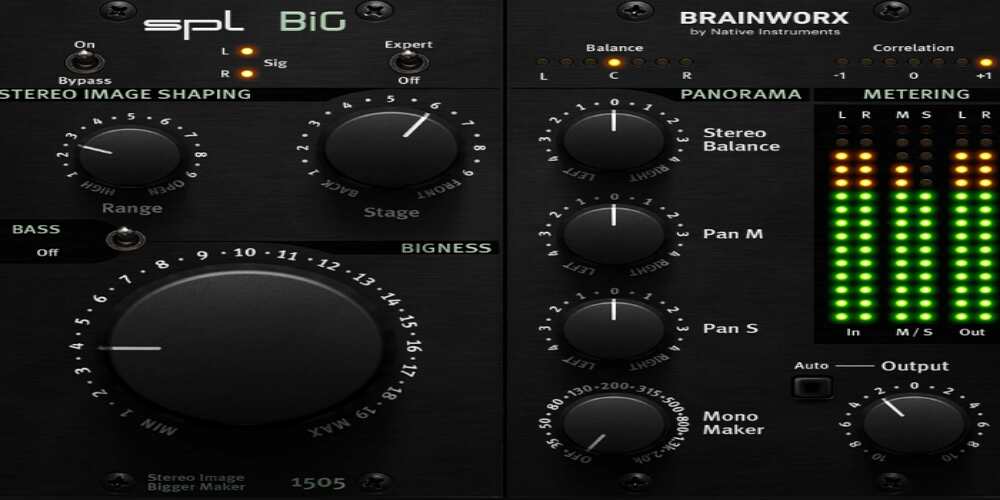
Most stereo wideners sound great in isolation and fall apart the moment you check mono compatibility. Drums that felt wide and open collapse to a narrow, phase-smeared mess. SPL BiG avoids this because it doesn’t use traditional mid/side processing at all. Instead, it models the TEC Award-winning SPL BiG 500-series hardware, using a proprietary filter network that expands the stereo field without the phase shifts that cause mono-fold problems.
The interface centers around three main controls: Range, which determines which part of the frequency spectrum gets processed; Stage, which adjusts the depth and soundstage position of the widened material; and Bigness, the main expansion amount knob. A Bass switch activates the AirBass circuit from the SPL IRON mastering compressor — a passive low-end filter that adds analog-style weight in a way a normal EQ shelf can’t quite replicate.
The hardware-plus-software Expert panel adds stereo balance, separate Mid and Side pan controls, Mono Maker (sums to mono up to 2kHz), M/S metering with solo buttons, and automatic gain compensation. The Mid/Side panning feature is particularly worth calling out — panning only the Side channel tilts the stereo image around the center rather than moving everything, opening up spatial options that a standard pan knob can’t achieve.
Phase-safe by design. That single attribute sets SPL BiG apart from most stereo wideners. When you push it hard, the mono fold-down stays clean. Engineers consistently report that it holds up in club sound systems and broadcast contexts where phase cancellation would normally be a concern. It works best on individual tracks and group buses — keyboards, strings, background vocals, pads — rather than as a full-mix maximizer.
Best for: EDM and hip-hop producers needing sub-bass generation; engineers treating kick drums and bass DIs
Formats: VST2, VST3, AU, AAX | Windows 10+ | macOS 64-bit | iLok required
Price: $99 (regularly $149) | All Access Pass from $19.99/month | 14-day free trial
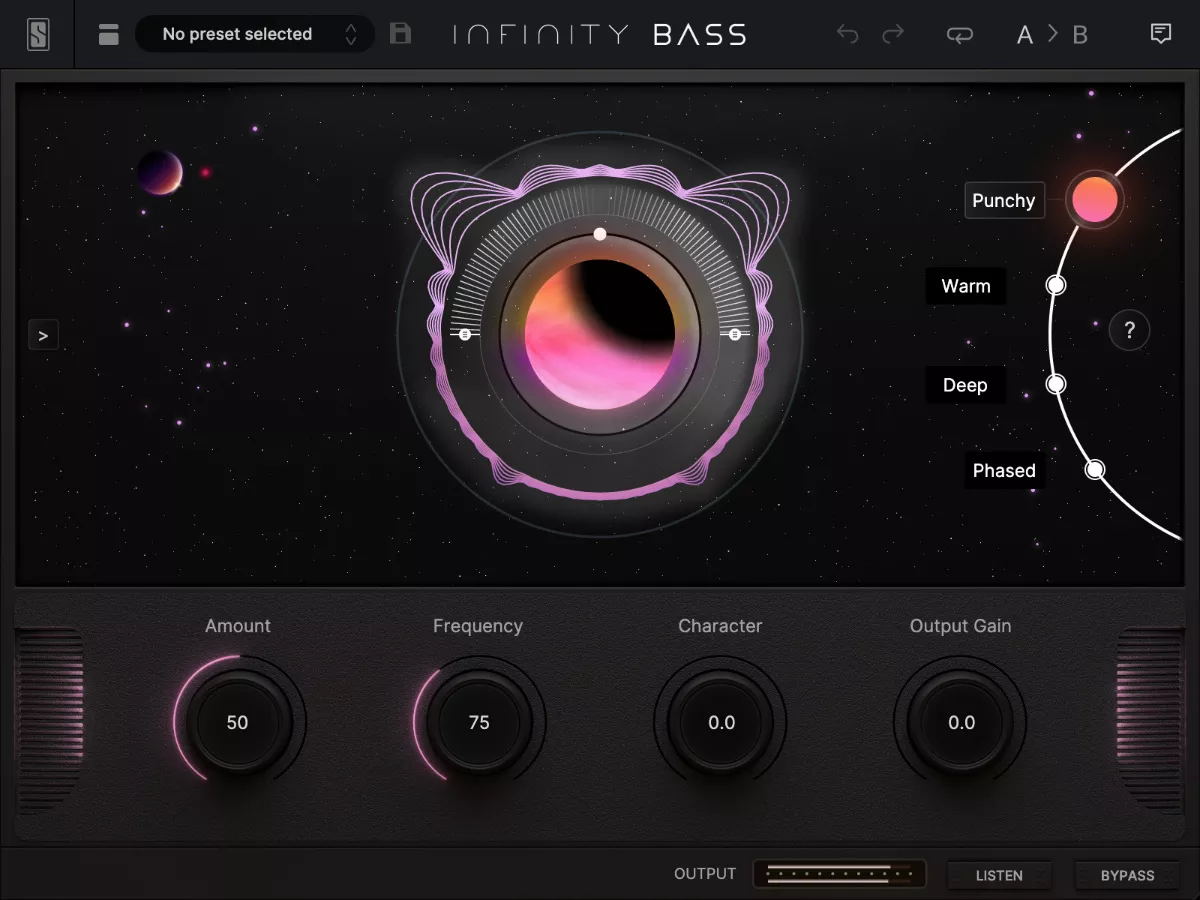
Low-end processing in a mix typically means stacking a sub-synth, an exciter, and a few EQ moves to get a bass element to sit right on every playback system. Slate Digital’s Infinity Bass collapses that chain into one plugin with four fundamentally different processing algorithms — not variations of the same approach dressed up with different labels.
Punchy is a bass exciter that generates harmonics above the fundamental, making kicks and bass lines cut through on small speakers where deep sub-bass is inaudible. Warm is a dual-band subharmonic synthesizer that creates sub content below the fundamental — best on monophonic material like bass DIs and synth lines. Deep is a clean sub-bass generator with a dynamics control letting you shape the decay of the generated sub rather than just piling on low-frequency weight indiscriminately. Phased uses an all-pass filter to add resonance in the low frequencies — the most subtle and experimental of the four, and most useful for mastering touches where the effect shouldn’t be immediately obvious.
The Listen button solos only what Infinity Bass is adding to your signal. You hear the generated subharmonics in isolation, enabling fast, precise parallel processing decisions. Combined with the real-time Visualizer, you get both a sonic and visual read on whether you’re being surgical or overdoing it.
Four genuinely distinct processing engines in one plugin. Where most bass enhancers offer a single algorithm with a knob that changes intensity, Infinity Bass lets you switch between an exciter, a dual-band subharmonic synth, a clean sub generator, and an all-pass filter depending on whether your problem is translation on small speakers, sub-bass generation, envelope control, or subtle mastering resonance.
Best for: Engineers who want compression, harmonic enhancement, and stereo width in one plugin with no loudness bias
Formats: VST2, VST3, AU, AAX, AAX AudioSuite | Windows 10/11 | macOS 12–15 (Apple Silicon)
Price: $150 regular | $70–100 on sale via Plugin Alliance | 14-day free trial
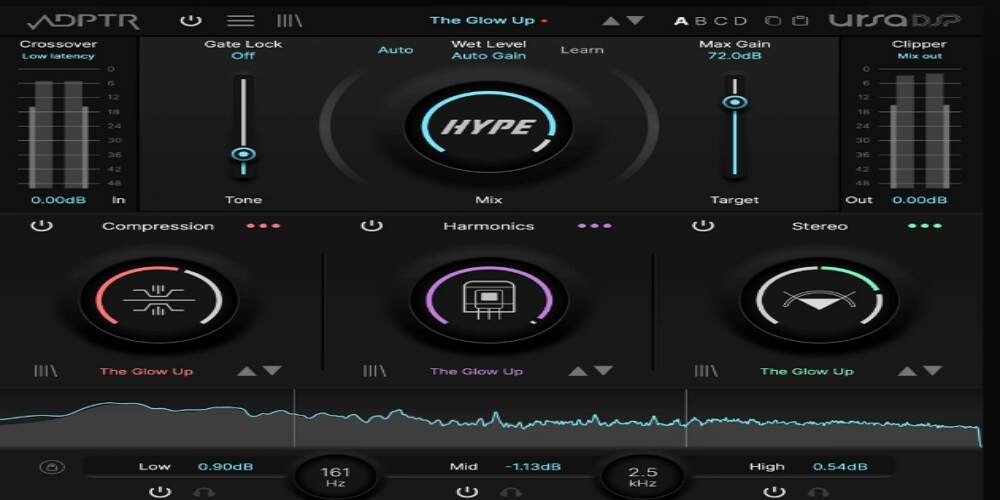
HYPE combines compression, multiband harmonic generation, and per-band stereo width control into a single workflow that replaces three or four separate inserts on a channel. It was developed in collaboration with UrsaDSP, and version 1.5 added meaningful new features including new harmonic modes and a multiband gate.
Most saturation-based enhancers add harmonic content by distorting the signal — which means the louder the input, the more harmonics you get, and the louder your output becomes. HYPE uses UrsaDSP’s Trajectory technology to generate harmonics without changing perceived loudness. This is important in practice because it lets you make objective decisions about the character you’re adding without your ears being tricked by volume increases. Combined with the Auto Level feature, HYPE is one of the only enhancers that genuinely prevents loudness bias.
The compression section offers Slam, Opto, Brick, Transient, Combo, and Gentle modes — each responding differently to incoming dynamics. Dedicated Transient, Mix, and Body controls let you shape how the compression grabs the front of a hit versus how it handles the sustain. The Gentle mode is specifically tuned for mastering situations. The Combo mode merges three compression behaviours into a blended result that’s hard to replicate with standard compressor controls.
The combination of gain-independent harmonics, six compressor modes with transient and body controls, and per-band M/S stereo processing in one plugin is genuinely unique. The 200-plus presets include developer notes, so you understand what each preset is trying to do and how to adapt it — not just a random bank of starting points.
Best for: Rock and metal producers wanting punchy low-end; mastering engineers adding controlled weight to full mixes
Formats: VST2, VST3, AU, AAX | Windows 7+ | macOS 10.13+ (Apple Silicon M1 native)
Price: Regular $80 | Sale $25–29 | Perpetual licence | 7-day free trial
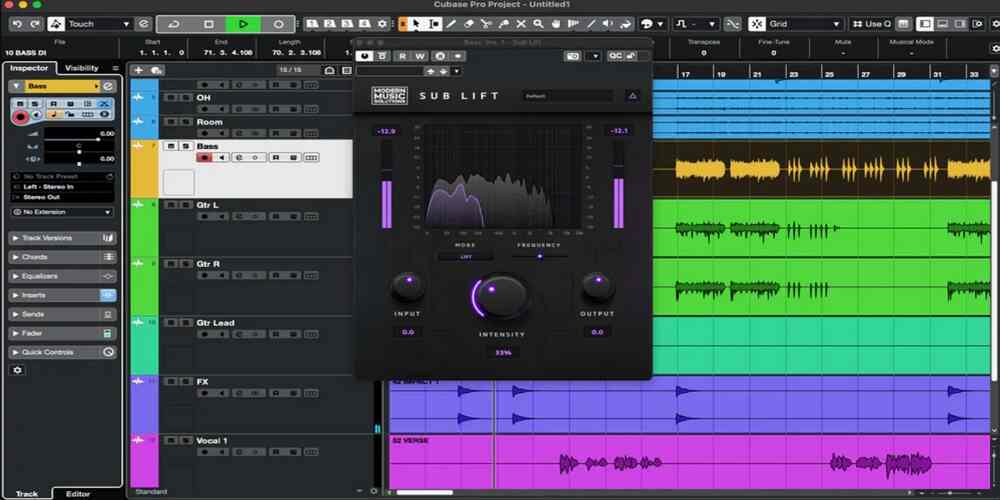
Modern Music Solutions is primarily known for rock and metal tools. Sub-Lift represents a deliberate step into a broader market — a low-end enhancer that works across genres, from hip-hop kick processing to mastering full orchestral mixes, using harmonic generation rather than the simple EQ curves most producers would reach for first.
Sub mode is built for transient-heavy material. It applies a focused bell curve enhancement to the sub-low range, with subtle dips on either side of the peak to reduce muddiness and increase clarity — the same frequency-selective approach that makes dedicated hardware enhancers worth the investment. Lift mode takes a broader view, adding harmonics across a wider frequency range with a flat response character. It works better on complex material like dense synth layers and full mixes where a tighter bell curve would feel too narrow.
Sub-Lift includes a Delta button that isolates exactly what the plugin adds to the signal, letting you hear only the enhancement. This feature is surprisingly rare among low-end enhancers and makes dialing in the right amount significantly faster — you’re listening to what you’re adding rather than trying to A/B toggle your way to a setting.
At $25–29 on sale with a perpetual license and free lifetime updates, Sub-Lift offers the best value proposition on this list. It handles the specific job of low-end harmonic enhancement cleanly and without unnecessary complexity. A popular technique among engineers: push the Lift setting to 100%, then follow it with a substantial low-shelf cut to warm up and blend the lower mid-range — something standard EQ can’t achieve with the same character.
Best for: Podcasters, content creators, streamers, and video producers who need fast, professional vocal cleanup
Formats: AU, VST3, AAX (no VST2) | Windows 10/11 | macOS Sonoma/Sequoia (Apple Silicon)
Price: $29 perpetual | Included in iZotope Everything Bundle | 10-day free trial
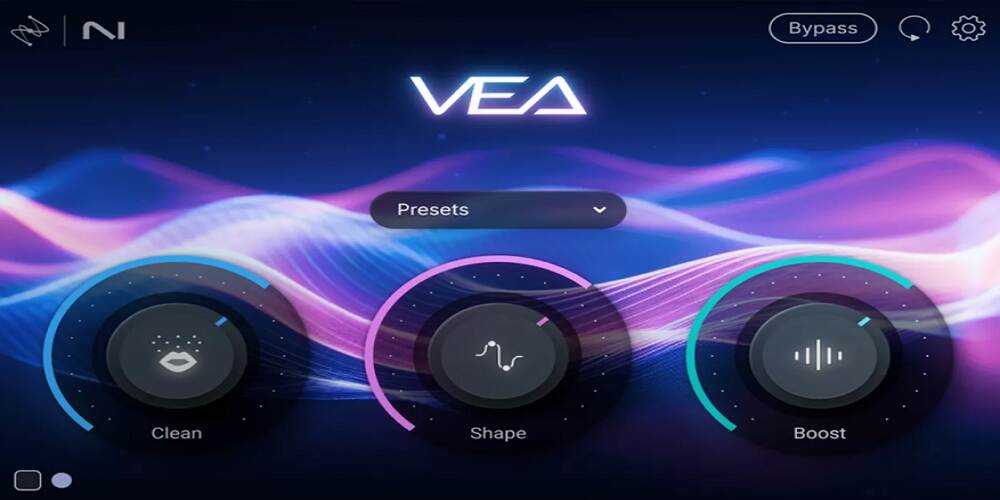
iZotope VEA is an AI-powered voice enhancement plugin that pulls from iZotope’s professional toolkit — the noise reduction from RX, the tonal shaping from Nectar and Ozone — and distils it into three controls accessible to producers without a dedicated audio engineering background. The AI analyses the incoming voice upon insertion and recommends initial settings based on the specific characteristics of that recording.
Clean is adaptive denoising that adjusts to the specific type of background noise in your recording, handling consistent low-level noise from HVAC systems, fans, and room ambience far better than a static noise gate. Shape applies an AI-tailored EQ curve based on analysis of your voice, targeting the specific frequencies that need attention rather than applying a one-size-fits-all frequency boost. Boost adds presence and power through compression and limiting optimised for voice material.
The Audiolens referencing feature lets you upload a target audio sample and match your recording’s tonal character to it — useful for achieving consistency across episodes or matching the sonic profile of a reference podcaster or broadcaster. VEA also works inside video editing NLEs including Premiere Pro and DaVinci Resolve, which no other plugin on this list offers and which directly serves the video production workflow.
At $29, VEA is by far the most affordable plugin on this list. It’s the only one with AI-driven voice analysis that tailors processing to the specific recording. The limitation to be aware of: VEA works best on consistent, low-level background noise. It doesn’t do de-reverb, and it struggles with complex or intermittent noise sources. For detailed multitrack vocal mixing with full parameter control, Nectar remains the better tool. But for fast, high-quality spoken-word enhancement, VEA is genuinely excellent at its price.
Best for: Musicians mixing their own recordings; workflow-focused engineers who want saturation, compression, and EQ in one insert
Formats: VST, VST3, AU, AAX | Windows | macOS 11.1+ (Apple Silicon)
Price: MSRP $149 | Typical sale ~$30 | PA subscription from $12.99/month | 14-day free trial
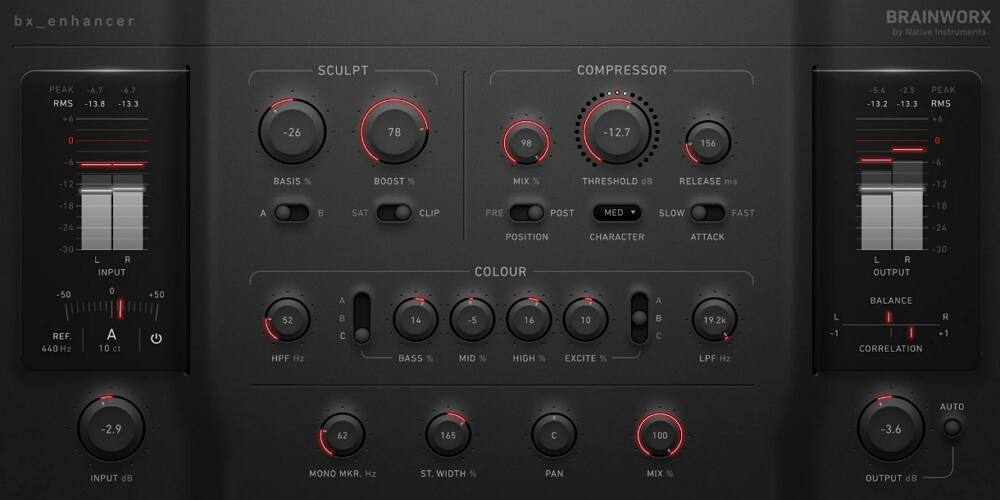
The bx_enhancer is a channel strip plugin that combines a saturator, clipper, VCA compressor, color EQ, and M/S stereo tools into a single, pre-configured signal path. It was designed around the observation that most mixing moves on a track follow the same basic sequence — add some harmonic character, control the dynamics, shape the frequency balance, check the stereo field — and that this sequence rarely needs to be re-ordered from track to track.
SAT mode delivers analog desk-style saturation with both even and odd harmonics, adding warmth without obvious distortion. Clip mode models a hardware diode clipper for more aggressive grit — useful on drums and synths where you want presence rather than warmth. The Basis knob acts as a tilt filter or mid-range modifier, letting you sculpt the tone before saturation hits. The compressor can be placed either before or after the tone-shaping section, which significantly changes its character — pre-placement gives you more control over dynamics before enhancement; post-placement preserves the natural dynamics of the saturated signal.
The Excite control in the Color section cuts the 1–5kHz range while simultaneously boosting 10–20kHz, adding air and presence without creating harshness. This specific curve is useful for vocals and acoustic instruments, where standard high-shelf boosts can create brittleness. The Mono Maker sums everything below a set frequency to mono, tightening the low end on group buses and stereo tracks where sub-bass muddiness tends to accumulate.
The built-in tuner — adjustable from 300 to 500Hz, including 432Hz — is unique among channel strip enhancers. The global Mix knob, which turns the entire chain into a parallel processor with a single click, is a practical workflow innovation. Auto Level prevents loudness bias, a feature most all-in-one channel strips omit.
Best for: Mix and mastering engineers adding harmonic richness across all five frequency bands; live sound engineers
Formats: AAX Native, AudioSuite, AU, VST3, SoundGrid | macOS 12+ | Windows 10/11
Price: MSRP $249 | Typical sale ~$35 | Free via Creative Access free tier | Unlimited free trial
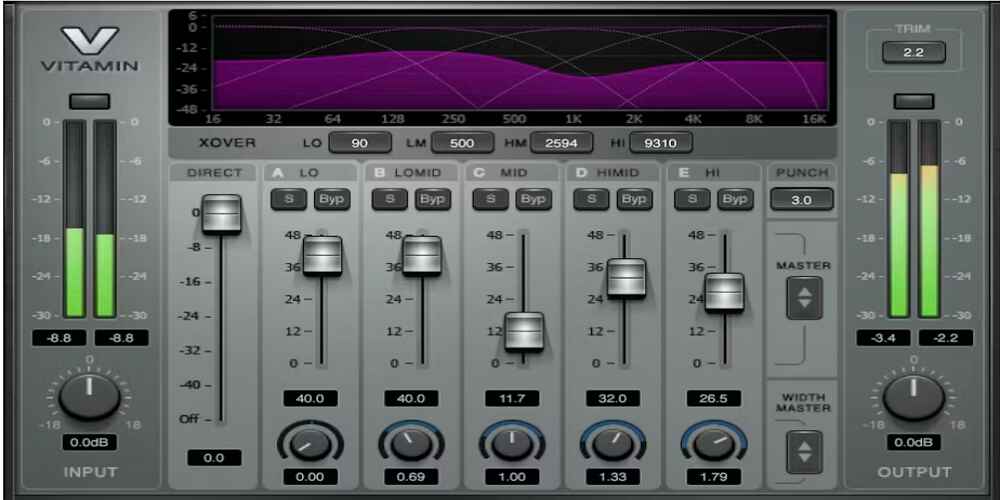
Waves Vitamin has been in active use since its release, and there’s a straightforward reason it keeps appearing in professional sessions across genres: it works on practically everything, and it operates at zero latency, making it equally useful in the studio, in mastering, and in live SoundGrid rigs. It’s a parallel multiband harmonic enhancer — it generates a harmonically enriched signal across five frequency bands and blends it with the original at whatever ratio you set.
Each of the five bands has its own gain fader that controls how much enhanced signal is blended in, an adjustable crossover point that sweeps from 20Hz to 18kHz, and — crucially — a per-band stereo width control. This width feature is the most important thing that separates Vitamin from competing multiband enhancers: you can keep the sub bass locked in mono while widening the high frequencies for airiness, or narrow the low-mids while expanding the top-end, all within a single insert.
The global Punch parameter shapes transients in the processed signal on a scale of 1–5. Above 3, it emphasizes the front of hits; below 3, it softens processed transients for smoother material like pads and vocals. The Direct fader sets the level of the unprocessed signal independently from the band faders — this means you control the dry level and enhanced level on separate axes rather than a single wet/dry blend, which makes parallel processing decisions more precise.
The combination of per-band stereo width control and zero latency makes Vitamin the most versatile enhancer on this list for deployment. No other plugin here can be used in the same workflow across in-ear monitors for a live show, a mixing session, and a mastering chain without any adjustment. At $35 on sale, it’s also one of the better value propositions here.
Best for: Producers who want transient punch and sustain enhancement with minimum setup; drum, vocal, and mix bus treatment
Formats: AU, VST2, VST3, AAX | macOS Catalina+ | Windows 10/11 | iLok required | Requires free VMR host
Price: $49 standalone | Included in All Access Pass ($19.99/month) | 14-day free trial
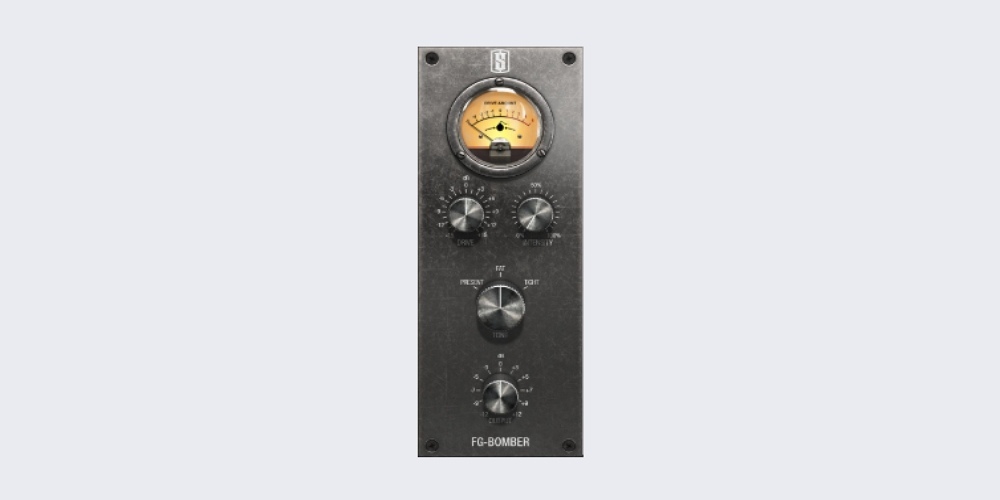
FG-Bomber is an analog-modeled dynamic impact enhancer that combines transient shaping, harmonic saturation, and compression into a black-box interface with just four controls. It’s part of the Slate Digital Virtual Mix Rack ecosystem and requires the free VMR host plugin to run — a minor friction point worth knowing about before purchase.
What distinguishes it from standard compressors or transient shapers is that it combines all three techniques simultaneously and dynamically — the processing responds to the character of the incoming signal rather than applying static processing. The Drive control sets the signal level into the processing engine, where a bomb icon on the VU meter marks the sweet spot Slate was designed around. Intensity controls the wet/dry blend of the processed signal.
Present focuses energy in the midrange for clarity and cut. Fat shifts toward the low end for body and warmth. Tight tightens transients for punch and definition without added weight.
Every experienced FG-Bomber user arrives at the same conclusion: a little goes a long way. Intensity around 30–40% consistently yields more natural results than pushing it harder. The plugin has a tendency to sound impressive at high intensity settings — and impressive is the enemy of transparent. Dial it in while watching a spectrum analyser on the output rather than just listening, and check mono compatibility before committing.
FG-Bomber occupies a unique space between compressors and harmonic exciters — it’s not really either, and there’s nothing else quite like it. Its simplicity makes it uniquely accessible for producers who want a single-knob solution for adding impact to kicks, snares, and vocal buses without needing to understand the processing underneath.
Best for: Mastering engineers and advanced mix engineers who want per-band saturation with surgical precision
Formats: VST, VST3, AU, AAX | macOS 10.9+ (Apple Silicon native) | Windows 7+ | No iLok
Price: $99 regular | ~$49 on sale | Unlimited demo (no time expiry) | Perpetual licence, no subscription
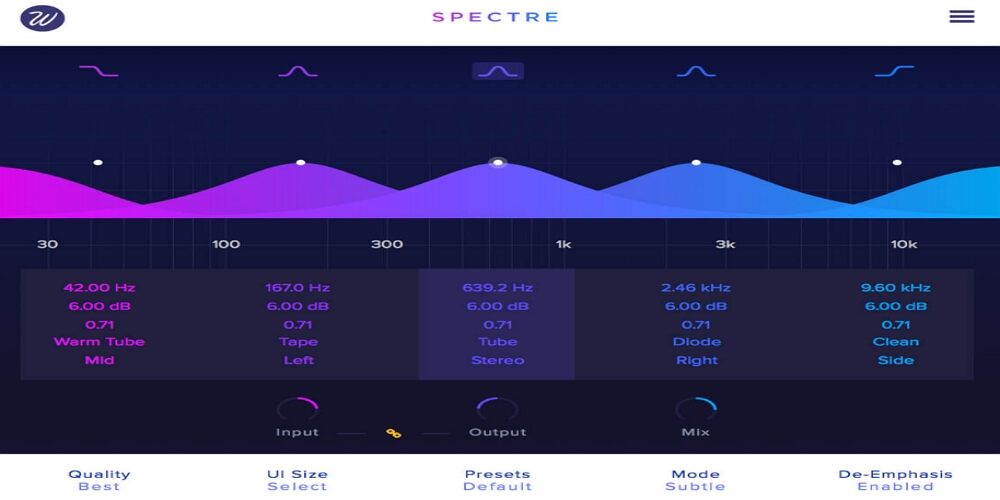
Spectre rethinks the enhancer workflow by framing it as a parametric EQ interaction. You set five bands on an EQ-style graphical display. Spectre extracts the difference between your EQ’d signal and the dry signal, processes that difference through a saturation algorithm of your choice, and mixes the resulting harmonics back in. The practical result: instead of a volume boost, you get a harmonic boost. You’re adding character and texture at specific frequencies rather than making those frequencies louder.
The ten types — Tube, Warm Tube, Solid, Tape, Diode, Class B, Bit, Digital, Rectify, and Half Rectify — cover a spectrum from smooth valve warmth to harsh digital grit. You can set a different algorithm for each of the five bands independently. Tape warmth in the lows, Tube presence in the highs. A Clean mode turns Spectre into a pure parallel EQ with no saturation for natural frequency boosts without harmonic content. De-Emphasis automatically compensates for EQ boosts after distortion, keeping overall levels balanced as you add harmonics across different bands.
Each band can independently process Mono, Stereo, Left, Right, Mid, or Side channel content. You can saturate only the Mid channel in the low-end to keep bass centred, while adding harmonic excitement to the Sides in the high frequencies to increase width. This degree of spatial control within a single enhancer insert is uncommon and particularly valuable for mastering applications where mono compatibility and spatial precision are paramount.
The difference-processing algorithm — operating only on what’s being equalised rather than the full signal — makes Spectre uniquely precise. The EQ-style graphical interface makes it approachable for engineers who already work comfortably with parametric EQs. At $49 on sale with no subscription requirement, no iLok, and an unlimited feature-complete demo, it has the lowest barrier to entry of any premium enhancer on this list.
Best for: EDM and hip-hop producers whose 808s and sub-bass need to translate across all playback systems
Formats: VST, VST3, AU, AAX | Windows 10+ | macOS 10.11+ (Apple Silicon native)
Price: $69 regular | $39 on sale | Baby Audio plan $14.99/month | Unlimited demo
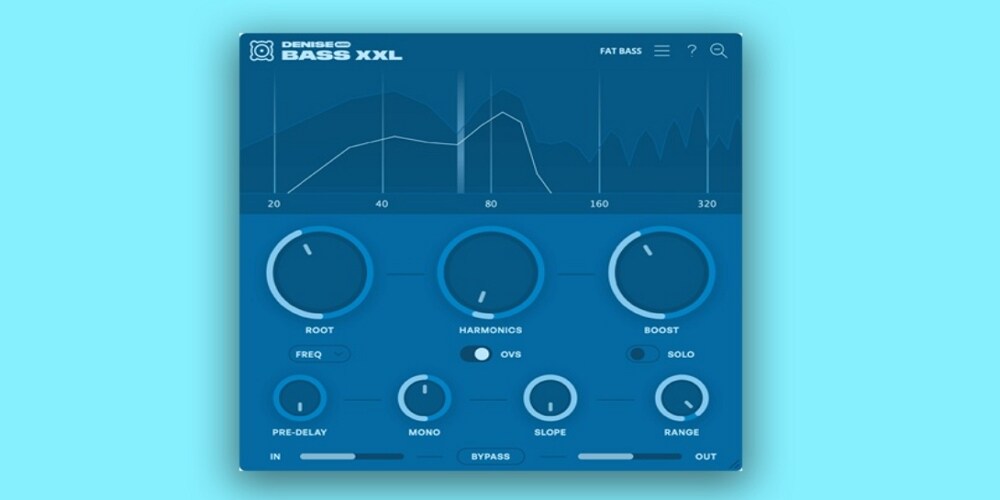
Bass XXL uses a psychoacoustic principle called the “missing fundamental” effect — the fact that our auditory system perceives a bass note based on the pattern of its upper harmonics, even when the fundamental frequency itself is absent or inaudible. This is why you can hear bass on a phone speaker that physically cannot reproduce 50Hz frequencies. Bass XXL generates harmonics above the target frequency that trigger this perception, making your bass sound full and heavy on earbuds, laptop speakers, and club systems alike.
Unlike subharmonic synthesisers that generate new content below the original signal, Bass XXL derives everything from the existing track. The result is phase-coherent and transparent — it enhances rather than replaces.
The Root control offers three modes: exact Hz targeting, musical note selection, and MIDI follow. In MIDI follow mode, Bass XXL receives MIDI input and updates its target frequency in real time as notes change — maintaining harmonic tuning as a bass line moves through pitches. This is rare among bass enhancers and genuinely solves a problem that fixed-frequency enhancement creates: when the bass plays a C and then moves to an E, a static enhancer generates harmonics appropriate for the C but wrong for the E. MIDI follow eliminates that inconsistency.
The Pre-Delay control adds a short gap between the dry signal’s attack and the onset of the generated harmonics. The natural punch of a kick or bass transient comes through cleanly before the harmonic weight is added, giving you the feel of a compressed low end without using actual compression. This is a practical and often underrated feature on any bass enhancement plugin.
MIDI follow for real-time pitch tracking distinguishes Bass XXL from every other bass enhancer on this list. Combined with the Pre-Delay transient control, the psychoacoustic approach, and small-speaker translation as its core design goal, it addresses a specific and common mixing problem that no other plugin here directly solves. At $39 on sale with an unlimited demo, it’s also an easy plugin to test thoroughly before committing.
The most common mistake is buying a general-purpose enhancer when what you actually need is a specific tool. Before spending money, identify the specific mixing problem:
Under $50: MMS Sub-Lift ($25–29 on sale), iZotope VEA ($29), Denise Bass XXL ($39 on sale). All three are purpose-built tools that outperform their price point.
$50–100: Wavesfactory Spectre ($49–99), Slate FG-Bomber ($49), Waves Vitamin (~$35 on sale). This tier offers the most value — professional-grade processing at consistently discounted prices.
$100–150: ADPTR HYPE ($70–100 on sale), SPL BiG (~$40–149), Slate Infinity Bass ($99). If you’re considering this tier, check subscription options first — Slate’s All Access Pass at $19.99/month includes both Infinity Bass and FG-Bomber.
The Slate Digital All Access Pass and Plugin Alliance subscription tiers offer access to entire plugin libraries for a monthly fee. If you’re building a new plugin collection from scratch and plan to use tools from either ecosystem regularly, the subscription maths often favours a monthly plan over individual purchases. However, if you’re adding one or two specific tools to an established setup, the perpetual licence is usually the better long-term investment.
Wavesfactory Spectre and MMS Sub-Lift are perpetual-only — no subscription option — which means no recurring costs and no dependency on a vendor’s pricing decisions changing in future.
Plugin Alliance, Waves, and Slate Digital all run significant Black Friday and holiday sale campaigns. Plugin Alliance typically discounts individual plugins 70–93% off during Black Friday, making plugins like ADPTR HYPE and SPL BiG available for under $40 that normally sit at $150. Waves runs near-perpetual bundle promotions but their deepest individual plugin discounts also appear in November and January. Setting a browser alert for the developer sites in October is the most reliable way to catch these windows.
Wavesfactory Spectre goes on sale less predictably but typically includes sale pricing in bundle deals during major plugin sale events.
The terms are often used interchangeably, and the distinction matters less than the marketing language implies. Technically, an exciter specifically generates new high-frequency harmonic content to add brightness and air. An enhancer is a broader category that may use excitement techniques alongside subharmonic synthesis, stereo processing, dynamic shaping, and psychoacoustic effects. Most modern enhancer plugins combine multiple approaches.
Yes, though the choice of plugin matters significantly at that stage. Wavesfactory Spectre, Waves Vitamin, and ADPTR HYPE were specifically designed with mastering applications in mind. SPL BiG is also commonly used on the 2-bus. FG-Bomber and Bass XXL tend to work better on individual tracks and group buses rather than the full mix.
Several do, but they work differently depending on the goal. iZotope VEA is purpose-built for spoken word and vocal cleanup. Brainworx bx_enhancer is effective for adding presence and controlling dynamics on vocal tracks. Waves Vitamin is widely used on vocal buses. ADPTR HYPE and Wavesfactory Spectre offer the most precise control for detailed vocal enhancement work. For basic brightening and air on vocals, the Excite control in bx_enhancer or Vitamin’s high-band fader will get you there quickly.
Slate Digital Fresh Air is a widely used free high-frequency enhancer that’s available on the Slate website. Several of the paid plugins on this list offer unlimited feature-complete demos with periodic noise bursts — Wavesfactory Spectre and Denise Bass XXL both work this way, meaning you can use them in full on any session before committing to purchase.
Other Related Guides: