 11
11
A flat, narrow mix is one of the fastest ways to sound like an amateur. Stereo width is what separates a track that wraps around the listener from one that feels cramped and two-dimensional. But raw width is only part of the equation. Apply it badly, and you get phase problems that make your mix disappear in mono, hollow low-end, and a smeared, unfocused sound that falls apart on earbuds and car speakers alike.
The best stereo imaging plugins give you control over where width is added, how much, and how to keep the mix glued together across every playback system. That means frequency-aware processing that keeps your bass centered, M/S tools that let you shape the center and sides independently, and clear visual feedback so you always know what is happening in the stereo field.
This guide covers eight plugins that approach stereo imaging in different ways, from precise mastering tools to creative three-dimensional wideners to the best free option available. Each pick is explained in enough depth that you will know exactly what it does, who it is for, and whether it belongs in your toolkit.
| Plugin | Price | Engine | Skill Level | Best For |
| PSP stereoController2 | Paid | M/S + Crossover | Advanced | Mastering / Correction |
| Leapwing StageOne 2 | Paid | Multiband | Advanced | Natural Mix Widening |
| PluginBoutique StereoSavage 2 | Paid | Multiband | Advanced | Creative Widening |
| Nugen Audio Stereoizer | Paid | IID + ITD | Advanced | Transparent Widening |
| Soundtoys MicroShift | Paid | Pitch/Delay | Beginner | Vocals & Instruments |
| UnitedPlugins Expanse 3D | Paid | Psychoacoustic 3D | Beginner | 3D Spatial Placement |
| SSL Fusion Stereo Image | Paid | Phase-Coherent | Beginner | Quick Clean Widening |
| iZotope Ozone Imager 2 | Free | Broadband + M/S | Beginner | Free Everyday Use |
| Best For | Mastering, stereo correction, M/S processing |
| Engine | M/S with frequency-split crossover controls |
| Formats | VST, AU, AAX |
| OS | macOS 10.14+, Windows 7+ |
Verdict: The most surgical stereo tool in this list. If you need to correct phase problems, tighten low-end, or master a full mix with confidence, stereoController2 is the go-to.
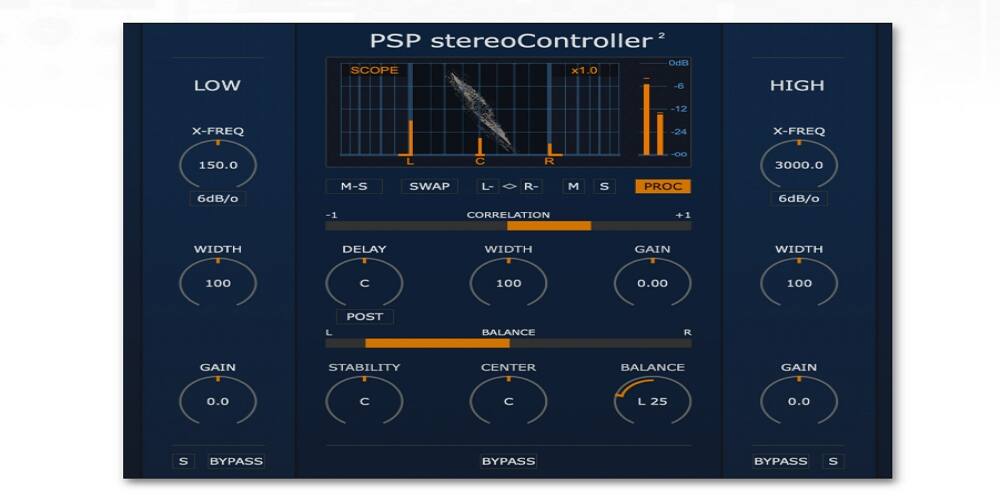
PSP stereoController2 is built for engineers who need to control exactly what is happening in the stereo field rather than just adding width and hoping for the best. The plugin separates the stereo signal into mid and side components and lets you process them independently, which means you can widen the sides of a mix while keeping the center strong, or tighten up a bottom-heavy side channel without touching the vocals sitting in the middle.
The mid-side mode is where stereoController2 earns its reputation. You can adjust level, width, and processing for the mid and side channels independently. In mastering, this is invaluable because it lets you add stereo width to the sides of a finished mix without changing how the lead vocal or kick drum sits in the center. In mixing, you can use it to balance how much of a stereo synth pad bleeds into the sides versus how much energy stays in the center image.
One of the most useful features in the plugin is the crossover control. You can apply different levels of stereo processing to different frequency ranges, which means low frequencies stay centered for mono compatibility and punch while mids and highs get as wide as you want. This is the right way to approach stereo processing on full mixes, and it is built right into the plugin rather than requiring you to split your signal across multiple instances.
The width parameter runs from fully collapsed mono all the way out to 400 percent stereo expansion. The balance control lets you shift the entire stereo image left or right without changing the width or the relationship between channels. This is useful for fixing recordings that are slightly off-center or for intentionally positioning a stereo source in the mix.
The real-time scope display shows you exactly how balanced and phase-aligned your mix is at any given moment. The built-in correlation and balance meters work alongside it, so you always have a second pair of eyes on potential phase issues before they become problems in playback.
| Pros | Cons |
| + Precise M/S and crossover control
+ Phase-safe widening up to 400% + Excellent corrective and mastering tool + Detailed real-time visual feedback |
– No creative modulation or LFO features
– Steeper learning curve for beginners – Less suited to individual instrument widening |
| Best For | Natural multiband widening on mixes and individual tracks |
| Engine | Frequency-aware multiband algorithm |
| Formats | VST, AU, AAX |
| OS | macOS, Windows |
Verdict: If you want the cleanest, most natural-sounding width without manual setup, StageOne 2 is the smartest option in this list.
Most stereo widening plugins hand you a knob and let you create problems you have to fix later. StageOne 2 works differently. Its algorithm automatically analyzes the frequency content of your audio and applies different amounts of width to different ranges. Low frequencies stay centered. Mids and highs spread out naturally. You do not have to set crossover points or manage bands by hand because the plugin does it for you based on what it is actually hearing.
The automatic frequency balancing is what sets StageOne 2 apart from simpler multiband wideners. Rather than fixed crossover points that may not suit your source material, the algorithm adapts its widening based on the content. The result is a smooth transition from centered lows to wider highs that sounds cohesive and musical rather than processed. You still get an overall width control to dial in the right amount, but the heavy lifting of frequency management happens automatically.
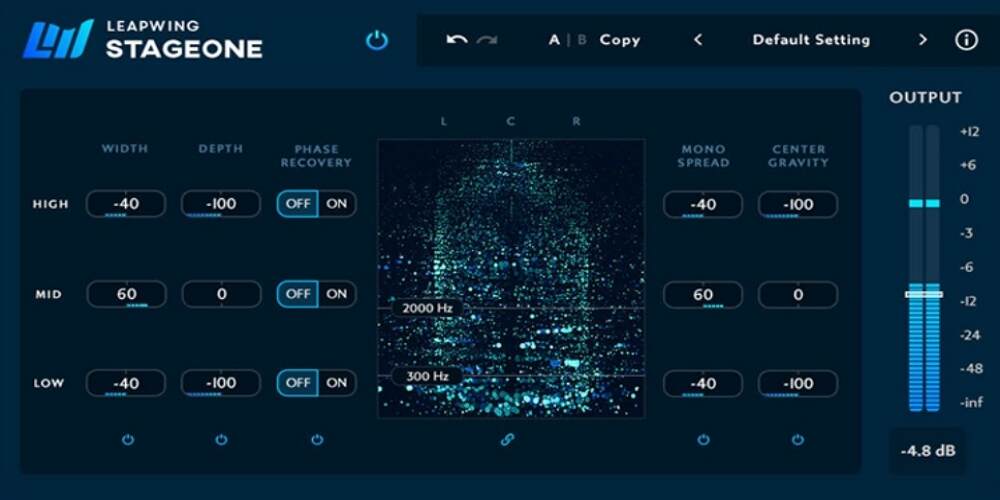
For engineers who want more hands-on control, StageOne 2 also offers a three-band workflow divided into high, mid, and low-frequency categories. Each band has individual Width, Depth, Phase Recovery, Mono Spread, and Center Gravity controls. This level of per-band detail is rare and useful when you need to handle a difficult source where the automatic balancing is not quite doing what you need.
StageOne 2 operates at zero latency, which makes it practical for live use and for mixing sessions where you want to avoid compensating for plugin delay. The algorithm does not introduce any buffering, so it behaves transparently in any signal chain.
The plugin has built-in mono compatibility protection that prevents you from adding width that causes phase cancellation in mono playback. The depth control adds a sense of front-to-back dimension to sounds without adding reverb, which is useful when you want distance and space without washing out the mix. The real-time visualizer lets you monitor stereo width and amplitude at the same time, giving you a clear picture of how your adjustments are landing.
| Pros | Cons |
| + Automatic frequency-aware widening
+ Zero latency for live and mixing use + Natural, musical sound with minimal artifacts + Detailed per-band control available |
– Less hands-on for engineers who prefer manual control
– Premium pricing – Limited creative modulation features |
| Best For | Creative multiband widening, mono-to-stereo, creative routing |
| Engine | Multiband with Detune, Delay, Reflect, Split modules |
| Formats | VST, AU, AAX |
| OS | macOS, Windows |
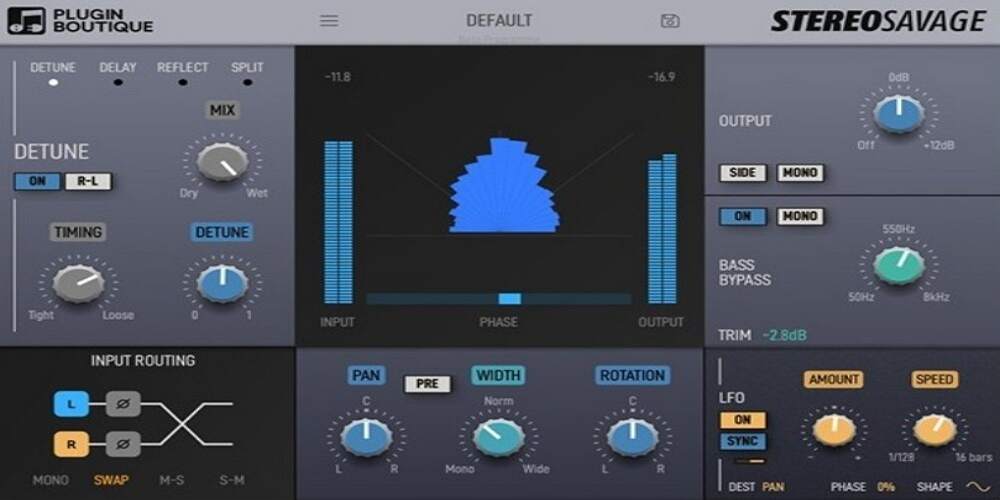
Verdict: The most feature-complete widener in this list. If you want a single plugin that handles corrective, creative, and experimental stereo work, StereoSavage 2 delivers.
StereoSavage 2 is not just a widener. It is a full stereo toolkit that covers width processing, mono-to-stereo conversion, transient and sustain processing, creative routing, LFO modulation, and M/S control all in one organized interface. The plugin is particularly useful for producers who work across a range of source material and want one tool that can handle whatever the session throws at them.
The four processing tabs (Detune, Delay, Reflect, and Split) each create stereo width from mono signals using a different method. Delay adds width by offsetting the left and right channels, which works well for percussive elements where you want spread without losing punch. Reflect mimics early room reflections to give sounds a sense of space without the wash of a full reverb. Split breaks frequencies into left and right channels for a natural-sounding wide image. Detune slightly pitches the channels apart for a chorus-like stereo effect.
The separate controls for transients and sustained sounds are one of the more practical features in StereoSavage 2. Transients generally benefit from being centered so drum hits stay punchy and focused. Sustain elements like room ambience, reverb tails, and pad layers can spread wide without losing the impact of the attack. Being able to set different width values for each means you are not forced to choose between punch and space.
The automatic bass mono summing keeps low frequencies centered regardless of how wide you push the mids and highs. The Bass Bypass option goes further, letting you choose to exclude low-end content from processing entirely so your sub frequencies remain completely untouched. This protection is important when working on club music or any genre where mono-compatible bass is non-negotiable.
The LFO opens up dynamic stereo effects like auto-panning and rhythmic width modulation. Combined with the routing tab that supports channel swaps, polarity flips, and M/S and S/M configurations, StereoSavage 2 can produce spatial effects that go well beyond simple widening. The built-in goniometer and phase correlation meter ensure you stay in control even when you are pushing the processing into unusual territory.
| Pros | Cons |
| + Covers corrective and creative widening
+ Transient vs. sustain processing + Safe bass mono summing built-in + LFO and creative routing options |
– Busy interface can feel overwhelming
– Easy to over-widen without discipline – LFO creative effects take time to learn |
| Best For | Transparent widening on buses, mixes, and individual tracks |
| Engine | IID (Inter-aural Intensity Difference) and ITD (Inter-aural Time Difference) |
| Formats | VST, AU, AAX |
| OS | macOS, Windows |
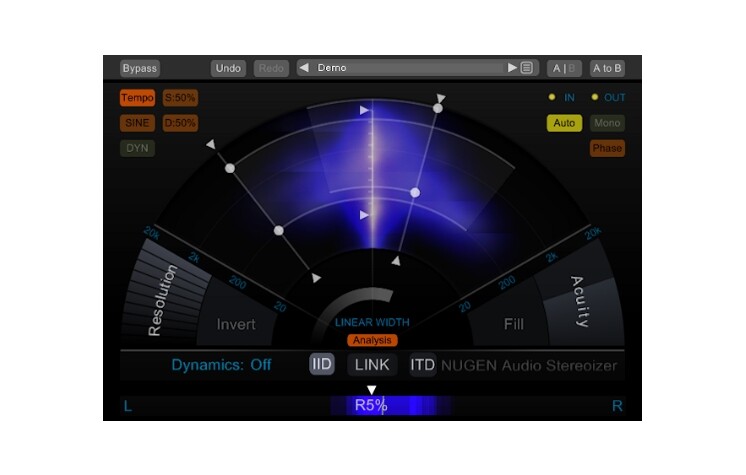
Verdict: The most transparent, broadcast-quality widener in this list. If natural-sounding, mono-compatible width is your priority, Stereoizer is the professional standard.
Nugen Audio Stereoizer is trusted in broadcast, post-production, and mastering studios for a specific reason: it produces width that sounds like the recording was wider to begin with, not like a plugin was applied afterward. The secret is in its dual-algorithm approach, which is grounded in how human hearing actually perceives spatial information rather than in the phase tricks and delays that most wideners rely on.
Standard mid-side widening works by boosting the side signal. Stereoizer goes further by modeling two distinct aspects of human spatial perception. Inter-aural Intensity Difference (IID) adjusts level differences between left and right channels to mimic the way sounds appear to come from different directions based on how loud they are in each ear. Inter-aural Time Difference (ITD) adjusts timing differences to mimic how a sound arrives at each ear at slightly different moments depending on its position. Both algorithms can be applied independently to a user-defined frequency range, which means you have fine control over the character of the widening effect.
Because Stereoizer models perceptual spatial cues rather than simply spreading a stereo signal, it can widen mono sources without introducing the phase artifacts that typically appear when you try to create width from a center-only signal. This makes it useful not just for full mixes and stereo buses but for individual mono tracks like vocals, guitars, and synthesizers where you want spatial dimension without any smearing of the original sound.
An onboard LFO lets you modulate the IID and ITD depths over time for dynamic, evolving width effects. The main display gives you a clear view of what is happening in the stereo field, including correlation information that shows you whether your processing is creating any mono compatibility risks. For a mastering or broadcast context where transparency and accuracy matter more than anything else, this metering gives you the confidence to push the plugin without second-guessing the result.
| Pros | Cons |
| + Perceptually accurate IID and ITD algorithms
+ Works on both stereo and mono sources + Transparent, broadcast-quality sound + LFO for dynamic stereo effects |
– Premium pricing
– Less creative than modulation-focused wideners – Interface is functional rather than visual |
| Best For | Adding width, richness, and dimension to vocals, guitars, synths |
| Engine | Micro pitch-shift + short delay (modeled on Eventide H3000 / AMS DMX 15-80) |
| Formats | VST, AU, AAX (native Apple Silicon and VST3 supported) |
| OS | macOS, Windows |
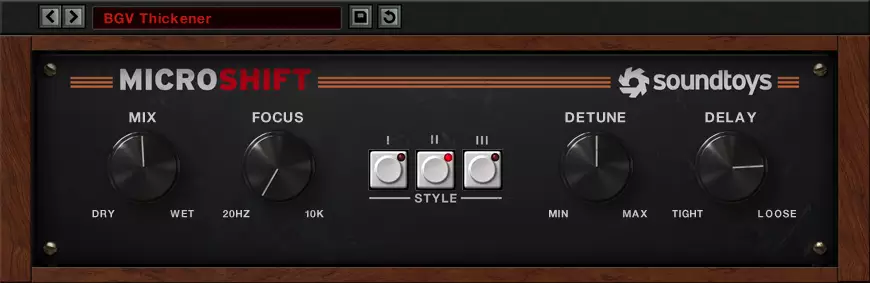
Verdict: The fastest way to add professional-sounding width to an individual track. MicroShift is a go-to for vocals, guitars, and synths that need space without surgical setup.
MicroShift does not approach stereo imaging the same way any other plugin in this list does. Instead of M/S processing, phase manipulation, or multiband analysis, it uses a combination of micro pitch-shifting and short stereo delay to create width that feels rich, warm, and musically satisfying. The character comes from hardware. The plugin models the Eventide H3000 Ultra Harmonizer and the AMS DMX 15-80, two pieces of outboard gear that have shaped the sound of countless hit records.
The three modes correspond to different circuit behaviors and give you range from subtle ambience to wide, dramatic spatial effects. The H3000 MicroPitchShift presets provide the tightest, most controlled widening and are particularly good on vocals where you want presence and air without obvious processing. The AMS DMX 15-80 mode has a slightly warmer, more diffuse character that works well on guitars and synths where you want the width to feel like room information rather than an effect. Classic Extreme mode pushes the widening further and introduces a subtle room-reverb quality that can make drums and pads sound enormous.
The Detune parameter controls how far apart the two pitch-shifted voices are, which determines how thick and chorused the widening sounds. The Delay control adjusts the timing offset between channels. The Focus knob is particularly practical because it sets the cutoff frequency above which the effect is applied. This means you can use MicroShift on a full vocal bus and prevent the bottom end from being affected, keeping the chest weight and body of the voice centered while the upper registers spread wide.
MicroShift is not the right tool for corrective stereo work or mastering. It is a tone-shaping effect that adds character alongside width. For background vocals, acoustic guitars, electric guitars, and synth pads, it is one of the most reliable and quick-to-use width effects available. It is also available as part of the Soundtoys 5 bundle, which makes it an exceptional value if you are investing in the full suite.
| Pros | Cons |
| + Hardware-modeled sound with real character
+ Fast to use with minimal controls + Focus knob prevents low-end widening + Excellent on vocals, guitars, and synths |
– Not a corrective or mastering tool
– No M/S or multiband controls – Requires iLok account (no physical dongle needed) |
| Best For | 3D spatial placement, depth, height, immersive sound design |
| Engine | Psychoacoustic 3D (spectral phase offset, delay networks, re-synthesis, saturation) |
| Formats | VST, AU, AAX |
| OS | macOS, Windows |
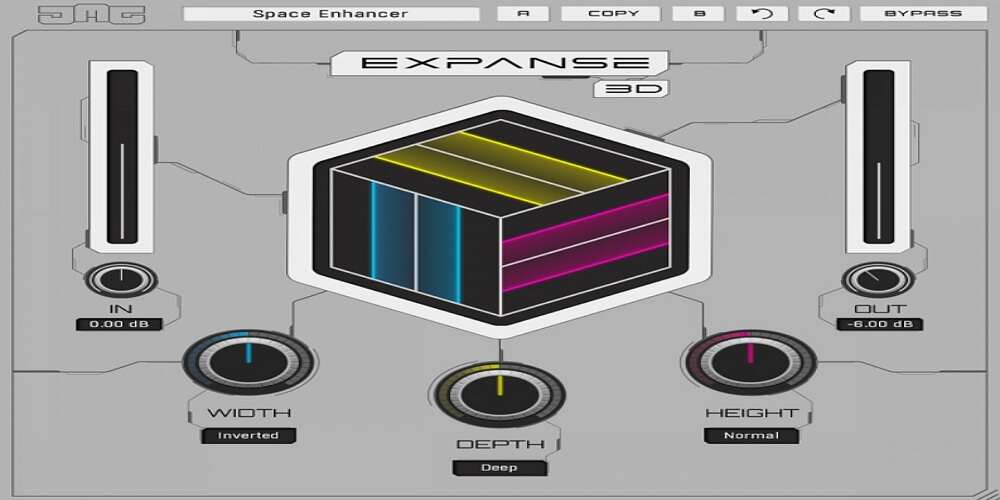
Verdict: Goes further than any other plugin here. If you are working on immersive, spatial, or atmospherically layered music, Expanse 3D opens up dimensions that standard stereo tools cannot touch.
Every other plugin in this list deals with the left-right stereo field. Expanse 3D works on three axes. Width on the horizontal X-axis, depth on the front-to-back Y-axis, and height on the vertical Z-axis. The processing behind these three knobs combines spectral phase offsetting, complex delay networks, re-synthesis, transient processing, and analog-style saturation to create spatial placement that sounds genuinely three-dimensional rather than just wide.
The Width knob uses the spectral phase processor to extend the mix horizontally with a spread that grows progressively from low to high frequencies, keeping bass tight while letting high-frequency content shimmer outward. The Depth control creates a sense of front-to-back distance using psychoacoustic processing that mimics how real spaces affect sound as it moves away from the listener. The Height control is the most unusual feature. It does not just adjust high-frequency EQ. It generates additional harmonics to make bass feel deeper and treble feel brighter, simulating the way sound interacts with ceiling and floor surfaces in a real acoustic environment.
The combination of techniques inside Expanse 3D is built on how the brain interprets spatial information rather than just phase relationships between stereo channels. This means the 3D effect holds up across different playback systems and stays mono-compatible even when the three-dimensional positioning is pushed far. The subtle analog-style saturation that runs through the signal chain adds warmth and coherence that prevents the processing from sounding clinical or overly digital.
Despite the complexity underneath, the interface is genuinely beginner-friendly. Three knobs handle the core processing, and additional menus below each knob let you adapt the algorithms to specific source material based on frequency content. The Smart Bypass feature switches the plugin in and out without clicks or pops, which is useful when automating the effect or A/B testing during a session.
| Pros | Cons |
| + True 3D spatial processing beyond left-right width
+ Mono-compatible across all three axes + Subtle harmonic saturation adds warmth + Simple interface despite complex processing |
– Can be dramatic on full mixes if overused
– Less suited to corrective or mastering tasks – Height and depth effects require experimentation to dial in |
| Best For | Fast, clean stereo width on buses and mixes |
| Engine | Phase-coherent width with automatic low-frequency mono summing |
| Formats | VST, AU, AAX |
| OS | macOS, Windows |
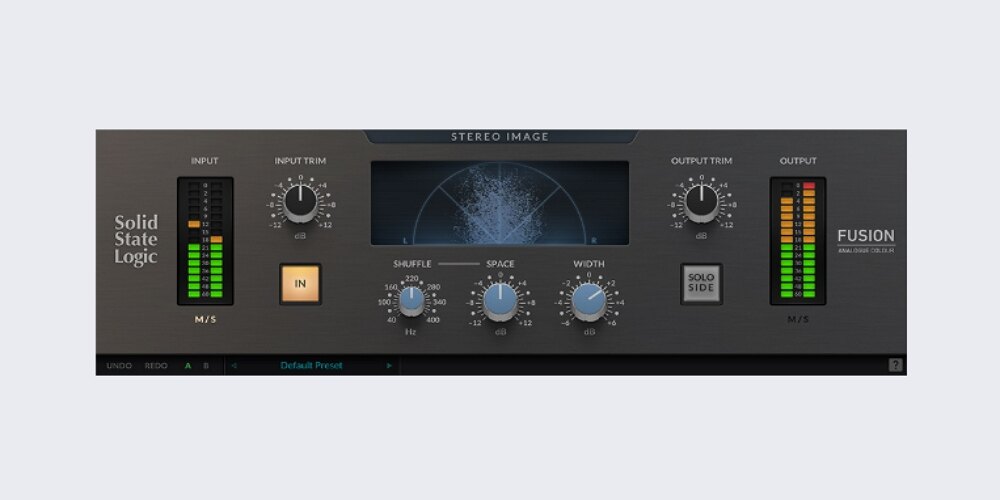
Verdict: The cleanest and most workflow-friendly widener in this list. When you need width that sounds like SSL and just works, this is the one to reach for.
SSL Fusion Stereo Image earns its place by doing one thing very well: making mixes sound wider, cleaner, and more professional with almost no setup. It is modeled on the hardware SSL Fusion stereo processor and carries the transparent, punchy character that SSL is known for. The single main width control moves smoothly from mono to wide stereo. There are no frequency bands to configure, no M/S modes to switch between, and no creative routing to set up. You load it, adjust the knob, and the mix sounds better.
The algorithm maintains phase coherence throughout the width range, which means your mix does not develop the hollow, comb-filtered sound that cheaper wideners produce when pushed hard. Transient information is preserved well, which keeps drums punchy and percussive elements sharp even at high width settings. The processing adds spatial dimension without changing the tonal character of the source material, which is exactly what you want from a transparent utility tool.
Automatic low-frequency mono summing keeps bass content centered regardless of the width setting. You can push the width knob hard and the sub and low-mid frequencies will automatically stay glued to the center. This protection removes one of the most common risks in stereo processing and means you can be more aggressive with the widening on mixes and buses without creating mono compatibility problems.
The plugin is exceptionally light on CPU resources, which makes it practical on large sessions where you might want to run it on multiple buses at once. The low overhead does not compromise the quality of the processing. It simply means the SSL character is accessible without the system cost that heavier algorithms sometimes carry.
| Pros | Cons |
| + Transparent SSL character
+ Automatic low-frequency mono summing + Very low CPU overhead + Simple workflow, minimal setup |
– Single-band only, no multiband control
– No M/S processing options – Not suited for corrective or surgical work |
| Best For | Free everyday widening, mastering checks, mono-to-stereo conversion |
| Engine | Broadband stereo width + Stereoize with Haas delay and transparent mode |
| Formats | VST, AU, AAX |
| Price | Free |
| OS | Windows 10/11, macOS Big Sur through Sonoma |
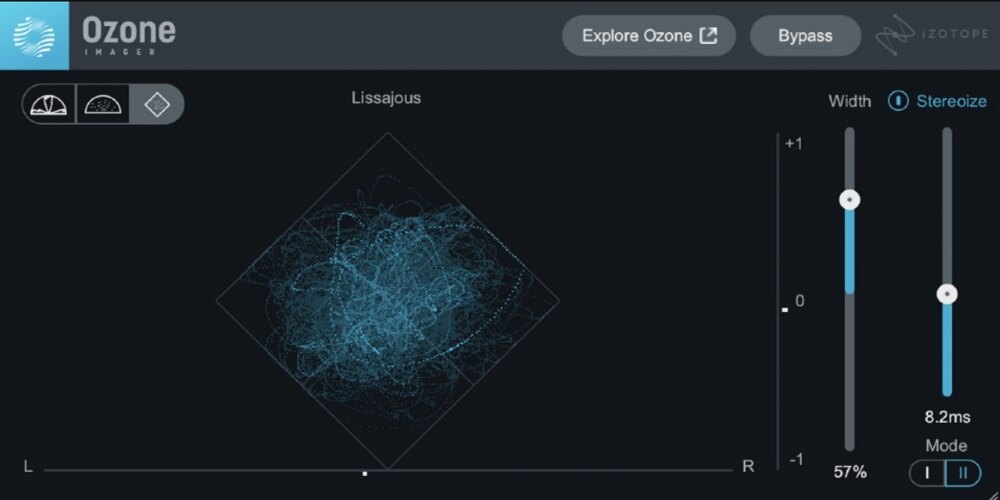
Verdict: The best free stereo imaging plugin available. Professional visual feedback, genuine mono-to-stereo processing, and zero cost make it a must-have for any producer.
Every list of stereo imaging plugins should include at least one genuinely useful free option, and Ozone Imager 2 is far above the competition in that category. It is not a stripped-down demo or a limited loss-leader. It is a complete, capable plugin that iZotope ships as a standalone free tool because they want producers to get familiar with their processing philosophy before investing in Ozone. The result is one of the most professional free tools in any plugin category.
The Width fader adjusts the level of the side signal, narrowing or widening the stereo image from mono all the way to an expanded stereo field. The Stereoize control is what makes Ozone Imager 2 more than a basic widener. It converts mono signals to stereo width using either the classic Stereoize I mode, which introduces a subtle phase-based character and can work well on elements where you want a unique edge, or the updated Stereoize II mode, which adds natural-sounding width without the phase character. Both modes avoid the hollow, washed-out sound that many free wideners produce.
The vectorscope and Lissajous display show the stereo field in real time, giving you an immediate view of width, balance, and phase relationships. For producers who are still developing their ears for stereo, this visual feedback teaches you as much as it measures. You can see exactly how aggressive widening affects the signal and whether the correlation meter is showing any mono compatibility risk before you print a mix.
Ozone Imager 2 is the right starting point for any producer who does not yet own a dedicated stereo imaging plugin. It handles broadband width adjustments, mono source widening, and detailed visual monitoring at no cost. For producers who find they need multiband control or more advanced M/S processing, the upgrade path into Ozone Standard or Advanced unlocks those features, but for most everyday widening tasks, the free version is genuinely sufficient.
| Pros | Cons |
| + Completely free
+ Professional vectorscope and visual feedback + Stereoize handles mono-to-stereo conversion + Clean, transparent broadband widening |
– No multiband control (locked to paid Ozone versions)
– Broadband approach limits frequency targeting – Stereoize I mode introduces phase coloration |
Stereo imaging is one of the areas of mixing where buying the wrong tool creates more problems than it solves. A plugin that does not suit your workflow or your source material can introduce phase issues, muddy low-end, or hollow mono compatibility problems that take hours to diagnose. The right choice depends on what you are actually trying to accomplish.
If you are working on full mixes at the mastering stage or need to fix phase problems and off-center recordings, you want M/S processing with frequency-split crossover control. PSP stereoController2 is the strongest option for this use case. Nugen Audio Stereoizer is the most transparent choice if you prioritize natural-sounding width without altering the character of the mix.
For adding width to a mix bus during the mixing stage, you want a tool that keeps low frequencies centered automatically and provides clear visual feedback. Leapwing StageOne 2 handles this with intelligent frequency-aware processing that requires almost no manual setup. SSL Fusion Stereo Image is the right choice if you want a fast, character-driven tool with minimal overhead.
For widening individual instruments, vocals, and synths, the right approach depends on how much character you want alongside the width. Soundtoys MicroShift adds warmth and presence alongside width and is particularly effective on vocals and guitars. StereoSavage 2 gives you more control with transient and sustain processing. Expanse 3D is the choice for creative, three-dimensional spatial work where you want the sound to occupy a defined position in an immersive soundstage.
If you are starting out or want a capable free tool to learn with, iZotope Ozone Imager 2 is the only recommendation. It provides professional-level visual feedback and genuine mono-to-stereo capability at no cost. Once you have developed your stereo processing instincts with it, you will have a much clearer sense of which paid plugin will serve your workflow best.
Understanding the basic mechanics behind stereo imaging plugins helps you use them more deliberately and diagnose problems before they become irreversible. Most plugins use one or more of these core approaches.
The most common and flexible method. The stereo signal is converted into a mid channel (the sum of left and right, representing centered content) and a side channel (the difference between left and right, representing the stereo information). Boosting the side channel makes the image wider. Cutting it makes it narrower or mono. M/S processing is powerful because it lets you treat the center and sides as independent signals, which is critical in mastering.
Introducing small timing differences between the left and right channels creates perceived width because the brain interprets arrival time differences as spatial distance. This is the basis for Haas-effect widening and for micro pitch-shift tools like MicroShift. The risk is phase cancellation in mono, which is why the best implementations include a Focus control that limits the effect to high frequencies where phase problems are less audible.
Advanced tools like Nugen Stereoizer and Expanse 3D model how human perception interprets spatial information using inter-aural intensity differences, inter-aural time differences, and spectral cues. This approach produces the most natural-sounding width because it works with the way the brain processes space rather than against it.
Any stereo width you add that relies on phase differences will partially or fully cancel when the left and right channels are summed to mono. The rule for professional mixing is to check your mix in mono regularly throughout the process. If something disappears or sounds thin in mono, the widening approach needs to be reconsidered. Keeping low frequencies centered is the single most important step for avoiding mono compatibility problems, which is why every quality stereo imaging plugin includes some form of automatic bass mono summing.
iZotope Ozone Imager 2 is the best free stereo imaging plugin by a clear margin. It provides broadband width control, a Stereoize mode for mono sources, a real-time vectorscope, and phase correlation metering at no cost. FLUX Stereo Tool V3 is a strong alternative if you need more granular independent left/right channel control and detailed M/S metering for free.
Yes, and this is the most important risk to understand when using any widener. Phase-based widening introduces timing differences between channels that partially cancel when the signal is summed to mono. The solution is to keep low frequencies centered using the bass mono summing feature that most quality plugins include, and to check your mix in mono regularly. Any stereo that disappears completely in mono is likely caused by phase cancellation.
Both, depending on what you need. Individual track widening using tools like MicroShift on vocals and guitars builds width into the mix at the source level, which gives you more control over the overall stereo image. Mix bus widening with tools like StageOne 2 or SSL Stereo Image adds a final layer of space and cohesion to the finished mix. Many engineers use both approaches but ensure that individual track widening is kept subtle so the mix bus processing has room to work.
M/S (mid/side) processing converts a stereo signal into a mid channel (the centered mono content) and a side channel (the stereo content). It matters because it lets you process the center and sides independently. You can widen the sides of a full mix without touching the lead vocal in the center, or cut low frequencies from the side channel to keep bass mono without affecting the mid. It is the most surgical and flexible stereo processing method and is essential for mastering work.
There is no universal answer, but a well-mixed track typically has its kick, snare, bass, and lead vocal in or near the center while guitars, synth pads, backing vocals, and percussion spread into the sides. Excessive width across the entire mix creates a hollow, unfocused sound and usually causes mono compatibility problems. The goal is contrast: tight elements in the center make wide elements sound even wider by comparison. Use a vectorscope or correlation meter to confirm your low end stays centered and your stereo width stays correlated.
Built-in DAW stereo width controls are useful for basic adjustments but most are simple side signal boosters with no frequency awareness, mono protection, or visual feedback. Dedicated stereo imaging plugins provide frequency-dependent processing that keeps low frequencies centered automatically, clear visual metering to prevent mono compatibility issues, and in many cases M/S processing and multiband control that the DAW’s native tools do not offer. For professional mixing and mastering, a dedicated plugin is worth the investment.
Stereo imaging is one of the most impactful and most misused tools in mixing. The difference between a mix that sounds wide, spacious, and professional and one that sounds thin, phased, or flat is almost always about control rather than quantity. More width is not always better. Width applied in the right frequency ranges, with the right tool for the source, and verified against a mono check is what actually translates across playback systems.
For mastering and precise corrective work, PSP stereoController2 and Nugen Audio Stereoizer are the professional standards. For natural multiband widening on full mixes, Leapwing StageOne 2 is the most intelligent option. For creative work on individual instruments and vocals, Soundtoys MicroShift delivers hardware character quickly. For spatial and three-dimensional sound design, Expanse 3D goes further than any other tool here. For fast, clean, SSL-quality widening on a mix bus, the SSL Fusion Stereo Image is unmatched for simplicity. And for producers who want to start learning stereo imaging without spending anything, iZotope Ozone Imager 2 is all you need to get started.
Pick the tool that matches what you are actually trying to do, use the visual feedback every plugin in this list provides, check mono compatibility before every mix print, and the results will follow.