 11
11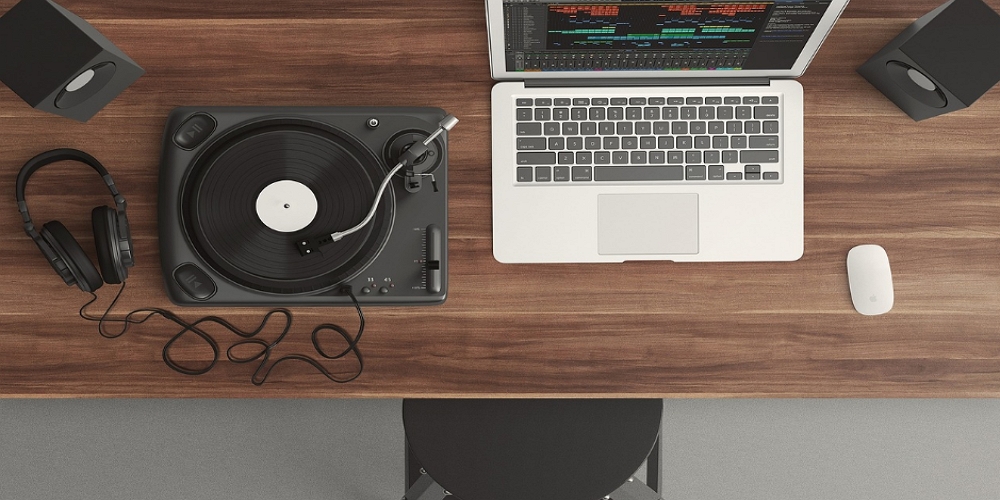
Learn How to Start Making Beats: Everything You Need to Go From Zero to Your First Finished Beat — No Expensive Gear Required
Here’s a secret the music industry doesn’t advertise: the laptop you’re reading this on is probably powerful enough to produce a professional beat. Right now. Today. You don’t need a room full of studio equipment, a degree in audio engineering, or a trust fund. You need a computer, free software, headphones, and the willingness to sound terrible for a while.
This guide is the one I wish someone had handed me before I wasted months hoarding plugins I didn’t understand and watching tutorials I never applied. We’re going to cover the complete journey—from setting up your tools to finishing your first beat, training your ears, dodging the traps that stall most beginners, and building a mindset that actually gets music out of your head and into the world.
Whether you’ve never opened a DAW or you’ve got a hard drive full of unfinished 8-bar loops, there’s something here for you. Let’s get into it.
The internet will happily convince you that beat-making requires a shopping list the length of a CVS receipt. It doesn’t. At the most basic level, you need exactly three things: a computer, a DAW (Digital Audio Workstation—the software where you build your beats), and a pair of headphones. That’s it. Everything else is a “nice to have,” not a “need to start.”
As you progress, a MIDI controller (a small keyboard or pad controller you plug into your computer) makes creating drum patterns and melodies feel more natural—like playing an instrument instead of clicking a mouse. An audio interface improves sound quality and reduces the tiny delay between pressing a key and hearing the sound. Studio monitors give you more accurate playback than consumer headphones. But none of these are required on day one.
💡 Pro Tip: If you catch yourself researching gear for longer than you’ve spent actually making music, you’ve caught Gear Acquisition Syndrome (GAS). The cure is simple: close the browser tabs and open your DAW.
Your DAW is the software where everything happens—recording, arranging, editing, mixing. Think of it as your studio, instrument collection, and mixing board rolled into one program. The one you choose will be your creative home for years, so it’s worth trying a few before committing. The good news? Many excellent options are completely free.
| Your Situation | Best Free Option | Why It Works |
| Total beginner, any device | BandLab (browser/app) | Zero install, works on Chromebooks and phones, built-in loops and instruments, collaboration features |
| Mac or iOS user | GarageBand | Pre-installed, intuitive, AI Drummer feature, direct upgrade path to Logic Pro |
| Windows user wanting depth | Cakewalk Sonar (free tier) | Powerful free Windows DAW with unlimited tracks and full plugin support |
| Beat-making focused | MPC Beats or Serato Studio | Purpose-built for beat-making workflows with step sequencers and sampling tools |
| Mobile-first producer | BandLab app or GarageBand iOS | Full DAWs on your phone—legitimate production tools, not toys |
If you’re willing to invest, FL Studio, Ableton Live, Logic Pro, and Studio One are the industry standards. Each has a different workflow philosophy: FL Studio’s visual step sequencer is brilliant for drum programming, Ableton’s Session View is ideal for experimenting with loops in real time, Logic Pro’s AI Session Players can generate backing tracks to jam with, and Studio One’s drag-and-drop workflow is fast and intuitive.
There is no “best” DAW. The best one is the one you learn deeply. Pick one, commit to it for at least three months, and resist the temptation to switch every time you see a flashy YouTube tutorial using something different. DAW-hopping is one of the fastest ways to guarantee you never actually learn any of them.
Your DAW will come with built-in instruments and effects. Start with those. Seriously—learn what your stock plugins do before downloading anything else. That said, once you’re comfortable, these free tools are genuinely world-class:
For samples, Cymatics offers a free vault of over a thousand professional-quality sounds. Looperman has a massive community-driven library of loops and acapellas. And Freesound.org is a goldmine for unique field recordings and textures that can give your beats personality.
Now you’ve got your tools. Here’s where most guides hand you a rigid recipe: “step one, add kick on beats 1 and 3; step two, add snare on 2 and 4.” That’s fine for your very first loop, but it teaches you to follow instructions, not to think like a producer. So let’s do both—start with a basic framework, then talk about the creative strategies that make real beats.
Set your tempo. Tempo defines the genre’s energy. Hip-hop and R&B typically sit between 70–100 BPM. Pop and house land around 120–130 BPM. Trap usually ranges from 130–170 BPM (though the half-time feel makes it groove at half that speed). Drill tends to sit around 140–145 BPM. Pick a BPM that matches the vibe you’re chasing.
Start with rhythm. Load a drum kit in your DAW and open the MIDI editor (also called the piano roll). Place a kick drum on beats 1 and 3, and a snare on beats 2 and 4. Add hi-hats on every eighth note. Congratulations: you’ve just programmed the backbone of thousands of hit songs. Now start moving things around. Shift a kick an eighth note early. Remove a hi-hat. Add a second snare hit. The magic is in the details.
Add a chord progression. If you know zero music theory, start with a minor scale—it’s the foundation of most hip-hop, trap, and lo-fi beats. Play three or four chords that sound good to you. Don’t overthink it. Your ears are smarter than you think. If it sounds right, it is right.
Write a bassline. The bass ties your rhythm and harmony together. A simple approach: play the root note of each chord in a rhythm that complements your kick pattern. In trap and hip-hop, this is often where the iconic 808 comes in—a long, sub-bass tone that gives the beat its weight.
Add a melody or hook. This is the part that makes a listener remember your beat. It can be a synth riff, a vocal chop, a plucked sample—anything that sits on top and catches the ear. If you’re producing for a rapper or singer, leave space for vocals here. The melody doesn’t need to be complex; some of the most iconic beats are built on simple, repetitive phrases.
💡 Pro Tip: Your first beats will sound rough. That’s the point. Every producer you admire started by making music they’d cringe at today. The goal isn’t perfection—it’s completion.
The quick-start framework is a solid default, but the best producers don’t always follow the same recipe. Varying your starting point keeps your music surprising—even to you. Here are seven approaches worth experimenting with:
Here’s the thing nobody tells beginners: making a fire loop is easy. Turning that loop into a finished beat is where most people get stuck—and where most people quit. Producers call it “loop syndrome,” “loopitis,” or simply “8-bar purgatory.” You create something that sounds great, nod your head to it for twenty minutes, tweak the hi-hats, adjust the mix, add another layer… and never actually arrange it into a song. Your hard drive fills up with brilliant beginnings and zero endings.
Loop syndrome isn’t a skill problem—it’s a psychology problem. You stay in the loop because the loop feels safe. Arrangement means making decisions that could “ruin” what you’ve built. Starting new loops gives you a hit of creative excitement; arranging an existing one feels like homework. The longer you listen to your loop, the more you lose objectivity about it. And honestly, many beginners simply don’t know what a full song structure looks like, so they avoid the part they haven’t learned yet.
The subtractive method is the single most recommended strategy among professional producers. Instead of building up from your loop, build down. Duplicate your complete loop across three to five minutes of timeline. Now delete and mute elements to sculpt different sections. Remove the drums for your intro. Pull out the melody for your verse. Bring everything back for the chorus. If traditional arranging is like painting a canvas from blank, subtractive arranging is like sculpting from a block of marble—you reveal the song by removing what doesn’t belong in each section.
The reference track map is equally powerful. Import a finished song in your genre. Place markers at every structural change—intro, verse, pre-chorus, chorus, breakdown, outro. Now copy those markers to your own project and arrange your loop to fit the same structure. You’re borrowing the blueprint, not the building.
The 30-minute loop timer is brutal and effective. When the timer goes off, you stop perfecting and start arranging. Period. No exceptions. Your arrangement doesn’t have to be good. It just has to exist. A messy finished beat teaches you ten times more than a perfect 8-bar loop that lives forever on your desktop.
If you’ve never arranged a beat before, here’s a structure that works across most genres:
| Section | Bars | What Happens |
| Intro | 8–16 | Set the mood. Introduce elements gradually—maybe just a filtered melody and a hi-hat. |
| Verse / Build | 8–16 | Add tension. Bring in the kick and bass, but keep some elements back. |
| Chorus / Drop | 16–32 | Full energy. Every element is present. This is the payoff. |
| Breakdown | 8–16 | Strip back. Create contrast by removing the drums or bass. |
| Chorus / Drop 2 | 16–32 | Full energy again, ideally with a slight variation to keep it fresh. |
| Outro | 8–16 | Wind down. Peel elements away until the beat fades into silence. |
Arrangement isn’t about adding more—it’s about deciding what the listener hears and when. Muting the bass before a chorus makes the drop hit harder. Pulling the drums out for four bars makes their return feel like a freight train. Small changes create big impact.
Your ears are the most important tool in your studio, and like any instrument, they get better with practice. Ear training for producers isn’t about identifying whether a note is C-sharp or D-flat (though that’s useful). It’s about developing the ability to hear what’s happening in a mix—where frequencies are stacking up, whether the bass is too loud, how much space the reverb is eating, why a professional track sounds “wide” and yours sounds “flat.”
Pick a beat you admire. Listen to it five times, focusing on a different element each pass: first pass for drums only, second for bass, third for melody, fourth for effects (reverb, delay, panning), fifth for overall arrangement (what appears when, what disappears). Load the song into your DAW if possible and loop individual sections. You’ll start hearing decisions you never noticed—the way the hi-hat pattern shifts after the chorus, the way the producer automated a filter sweep on the synth. This practice alone will improve your production faster than any plugin purchase.
SoundGym offers free, gamified daily workouts that train you to identify frequencies, detect compression, and compare stereo fields. Quiztones lets you import your own music and quiz yourself on EQ frequencies in just a few minutes per day. Hooktheory’s Chord Crush app uses real songs to teach you to recognize chord progressions by ear—a game-changer for writing harmonic content.
💡 Pro Tip: Spend ten to fifteen minutes on ear training before each production session. Start by listening to a well-produced reference track for a few minutes to “calibrate” your ears. Then do a few rounds on SoundGym or Quiztones. It’s the producer equivalent of a pianist’s warm-up scales.
Every experienced producer can point to mistakes that cost them months. Here are the ones that come up again and again in producer forums, AMAs, and interviews—along with how to sidestep them.
Mixing while creating. This is the fast track to paralysis. When you’re building a beat, your job is to make creative decisions—which sounds, which rhythms, which notes. Mixing is a completely different mode of thinking. Trying to do both at once is like editing a novel while writing the first draft. Separate your sessions: create first, mix later.
Overcrowding the mix. More sounds does not equal a better beat. Some of the most iconic beats in hip-hop history use five or fewer elements. If your beat sounds muddy, the fix is usually subtraction—remove the weakest element, not add a new one.
Skipping arrangement entirely. A loop is not a beat. A beat is a loop that goes somewhere. If you only practice making loops, you only get better at making loops. Deliberately practice the uncomfortable parts: arrangement, transitions, intros, outros.
Comparing your chapter one to someone else’s chapter twenty. The producers you look up to have been doing this for years—often over a decade. Deadmau5 started producing at 16 and didn’t break through until he was about 30. Your early beats are supposed to be rough. That’s evidence of progress, not failure.
Tutorial paralysis. Watching tutorials feels productive but often isn’t. A useful ratio: for every 30 minutes of tutorials, spend at least 3.5 hours actually making music. Better yet, watch a tutorial and immediately apply the technique in a beat before watching the next one.
Waiting for inspiration. Professional producers treat beat-making like a job. They sit down and create whether they feel inspired or not. Inspiration visits most reliably when you’re already working. The muse rewards the person who shows up.
The beat-making landscape has shifted dramatically in the last two years. Here’s what matters if you’re starting out right now.
AI music tools are no longer a novelty—they’re part of the modern producer’s toolkit. Platforms like Suno and SOUNDRAW can generate full musical ideas from text prompts, and major DAWs have started integrating AI features directly. Logic Pro’s Session Players generate realistic backing tracks. FL Studio’s AI assistant can help with sound selection and mixing suggestions. Cubase introduced AI-powered melodic pattern generation.
The honest take: AI is excellent for inspiration and learning—generating chord progressions to study, creating quick reference demos, or breaking through creative blocks. It is not a replacement for developing your own skills. The producers building real careers are using AI as one tool among many, not as a crutch.
AI-powered stem separation is now built into Ableton Live, Logic Pro, Cubase, Studio One, and FL Studio. This means you can take any song and isolate its vocals, drums, bass, or melody into separate tracks. For sampling—a fundamental beat-making technique—this is transformative. Want to chop just the vocal from an old soul record? Previously you needed the original stems. Now your DAW can do it in seconds.
BandLab has over 100 million users producing music on phones and tablets. Its feature set includes stem separation, hundreds of virtual instruments, and AI-powered composition tools—all free. Koala Sampler (around $5 on iOS and Android) is a favourite among lo-fi and boom bap producers for its fast, playful sampling workflow. You can start a beat on your phone during a commute and finish it on your laptop at home. The gap between mobile and desktop production has never been smaller.
Here’s the uncomfortable truth: the technical part of beat-making is the easy part. The hard part is the psychology. Most beginners don’t quit because they lack talent. They quit because perfectionism convinces them their work isn’t good enough, imposter syndrome tells them they don’t belong, and the gap between what they can hear in their head and what comes out of their speakers feels unbridgeable.
There’s a famous teaching experiment where one ceramics class was graded on quantity of pots produced and another on the quality of a single pot. The group producing the most pots also produced the best pots—because they learned through repetition. The same principle applies to beats. Making eight rough beats in two months teaches you more than spending two months perfecting one. Volume is your fastest teacher.
💡 Pro Tip: Let every idea in the door. Don’t assign a bouncer to your creativity. The terrible ideas have a funny way of leading to brilliant ones—but only if you let them in first.
You’ve read the guide. You know what tools to grab, how to structure a beat, how to break out of loops, how to train your ears, and how to manage the mental game. Now it’s time to prove it to yourself with a simple challenge:
Week 1: Install your DAW and make one complete 8-bar loop using only stock sounds. Spend no money.
Week 2: Take your best loop and arrange it into a full beat using the subtractive method. It doesn’t have to be good. It has to be finished.
Week 3: Make a beat using a different creative starting point—if you started with drums last time, start with a sample or chord progression this time.
Week 4: Make a beat in under one hour. Export it. Share it somewhere—SoundCloud, a Discord server, a group chat, anywhere. Getting music out of your laptop and into someone’s ears is the final skill, and it’s the one that matters most.
By the end of this month, you’ll have four finished beats. They won’t be masterpieces. They’ll be something better: evidence that you’re a producer who finishes what they start.
The world doesn’t need another person researching how to make beats. It needs another person to make them. Close this article and open your DAW. Your first beat is waiting.
Download a free DAW like BandLab or GarageBand, watch one beginner tutorial for your chosen DAW (20 minutes max), and start placing drum sounds in the MIDI editor. Your first beat will be simple—that’s the point. Complexity comes with practice, not preparation.
Not to start, but it helps as you progress. Learning the basics—major and minor scales, simple chord progressions, what a key is—takes a few hours and will save you weeks of trial and error. You don’t need formal training; YouTube tutorials on “music theory for producers” cover everything you need.
Absolutely. BandLab is a full DAW that runs on iOS and Android with over 100 million users. Koala Sampler is a fantastic mobile sampling app. Some producers have released commercially successful music made entirely on phones and tablets.
BandLab (browser and mobile), GarageBand (Mac/iOS), and Cakewalk Sonar’s free tier (Windows) are the strongest free options. Each is a legitimate production environment, not a stripped-down demo.
You can make a basic beat on your first day. Making beats that sound professional typically takes six to twelve months of consistent practice. The key word is consistent—thirty minutes daily gets you there faster than occasional marathon sessions.
AI tools like Suno can generate complete musical ideas from text prompts. They’re useful for inspiration and learning. However, developing your own skills is what gives your music a personal voice. Think of AI as a creative collaborator, not a replacement for the human behind the beat.